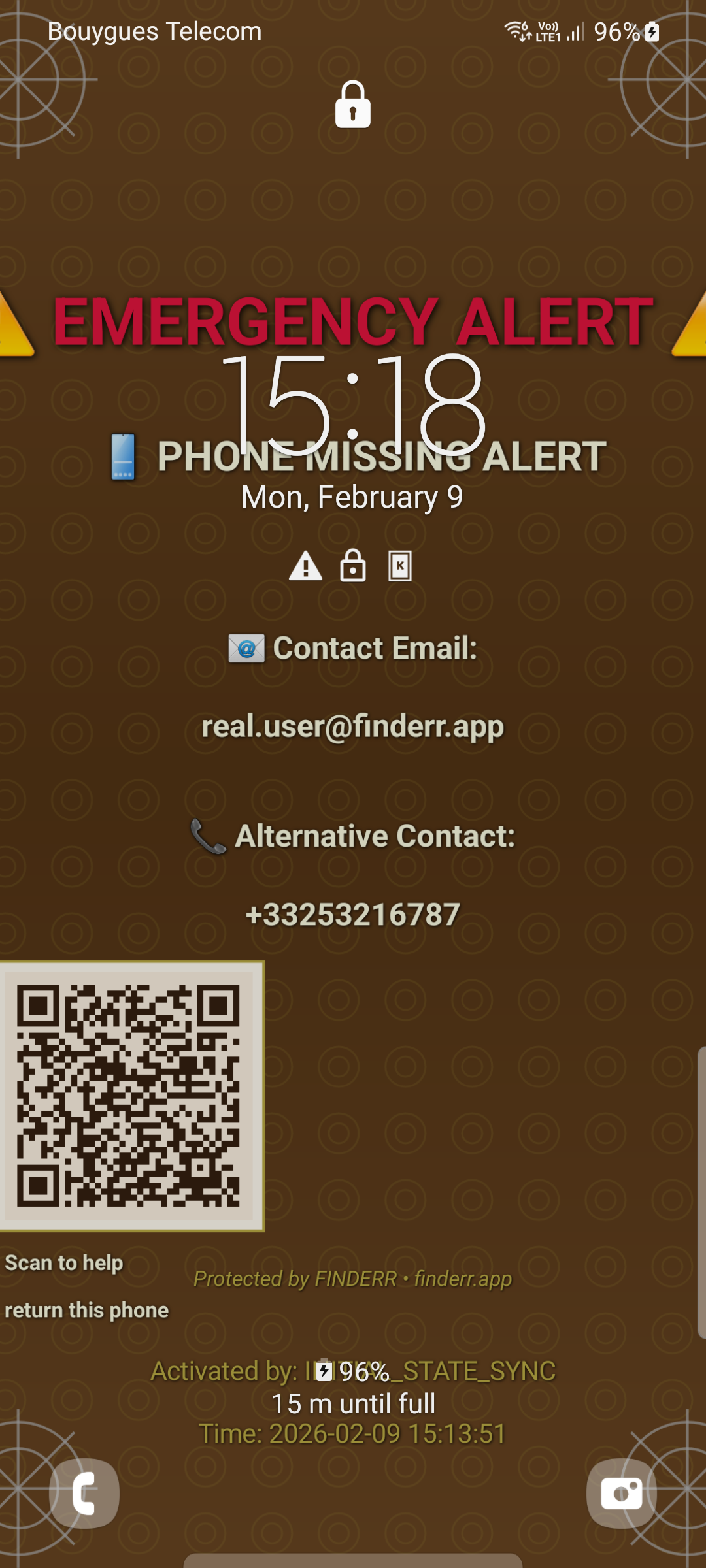
Free on your device. Emergency wallpaper, QR code on lockscreen. Web dashboard for remote activation and contact updates at €8.99/month or €89.99/year. Core protection is free — upgrade when you need remote control.
FINDERR is the reference implementation of Finder-First Phone Recovery — a design paradigm for how lost phones actually come home.
✅ Emergency wallpaper + QR code — free on Google Play ✅ Web dashboard activation ✅ No credit card needed ✅ Android 9+ compatible
Your phone recovered in 4 steps — no unlock required on the finder's side
Install FINDERR. Add your emergency contact — name, phone, email. Takes 2 minutes. If you lose your phone, activate its emergency screen remotely from any browser.
You lose your phone. Activate via the web dashboard from any browser, anywhere. Activate from any browser, anywhere.
Your Android lockscreen instantly shows your emergency contact info and a unique QR code. Visible to anyone. No unlock needed.
They read your contact info — or scan the QR to open a secure page at hub.untrapd.com/found. They call. Your phone comes home.
💡 FINDERR functions as an ICE (In Case of Emergency) contact system for Android — making your recovery info instantly visible on the locked screen for emergency responders and anyone who picks up your phone.
100% optimized for Android - no iOS bloat, just pure Android excellence
Built exclusively for Android. Material Design 3, native Google integration, optimized battery life. No iOS compromises.
Free: emergency wallpaper with phone number + basic activation. Premium: QR code + email on wallpaper, full remote management, live contact updates. €8.99/month or €89.99/year.
Emergency wallpaper with your phone number — free, no time limit. Premium adds QR code + email on the wallpaper, plus full web dashboard for remote management. ~25% recovery free → ~65% premium.
Remote lockscreen activation via the web dashboard. Display your contact info so anyone who finds your phone can reach you.
A unique QR code appears on your emergency lockscreen. The finder scans it → a secure page shows your contact info → they call you. No app needed on their side.
Efficient background processing with minimal battery impact. Native Android optimization for extended device life.
📖 How to Show Contact Info on Your Android Lockscreen — Free guide covering all methods including FINDERR
When you activate emergency mode, your lockscreen transforms instantly. Your contact information displays prominently, making it easy for anyone who finds your phone to reach you.
Free on-device protection. Premium web dashboard for remote control and remote contacts updates.
Free guides for losing — or finding — a phone
Step-by-step guide to returning a found phone to its owner.
🚕What to do in the first 15 minutes to maximize your chances.
⏱️A timed checklist to maximize recovery in the first hour.
🧭Why FINDERR optimizes for the finder, not the owner.
🆚The two paradigms, side-by-side.
📚FINDERR is Component 3 in a wider recovery stack — see the full setup.
✈️11 steps before you go — covers FINDERR setup + the gaps it doesn't.